Category: Plan

  • Short Post

    Short Post

    Just a quick ‘nothing’ post this time. I’ve been very busy with college applications and the holidays. I’ll post again soon once application season settles down a bit. I stumbled across an interesting on genetic algorithms. That sounds so interesting I think my next post may be on that topic!

    – William

  • First Experiment with SHAP Visualizations

    First Experiment with SHAP Visualizations

    In my previous post, I touched on model explainability. One approach for feature attribution is called SHAP, SHapley Additive exPlanations. In this post I will cover my first experiment with SHAP, building on one of my previous notebooks. My GitHub repo containing all of my Jupyter notebooks can be found here: GitHub – wcaubrey/learning-naive-bayes.

    What is SHAP

    SHAP (SHapley Additive Explanations) is a powerful technique for interpreting machine learning models by assigning each feature a contribution value toward a specific prediction. It’s grounded in Shapley values from cooperative game theory, which ensures that the explanations are fair, consistent, and additive.

    What SHAP Does

    • It calculates how much each feature “adds” or “subtracts” from the model’s baseline prediction.
    • It works both locally (for individual predictions) and globally (across the dataset).
    • It produces visualizations like force plots, summary plots, and dependence plots.

    What SHAP Is Good For

    • Trust-building: Stakeholders can see why a model made a decision.
    • Debugging: Helps identify spurious correlations or data leakage.
    • Fairness auditing: Reveals if certain features disproportionately affect predictions for specific groups.
    • Feature attribution: Quantifies the impact of each input on the output.

    Ideal Use Cases

    • Tree-based models (e.g., XGBoost, LightGBM, Random Forest)
    • High-stakes domains like healthcare, education, finance, and policy
    • Any scenario where transparency and accountability are critical

    My notebook changes

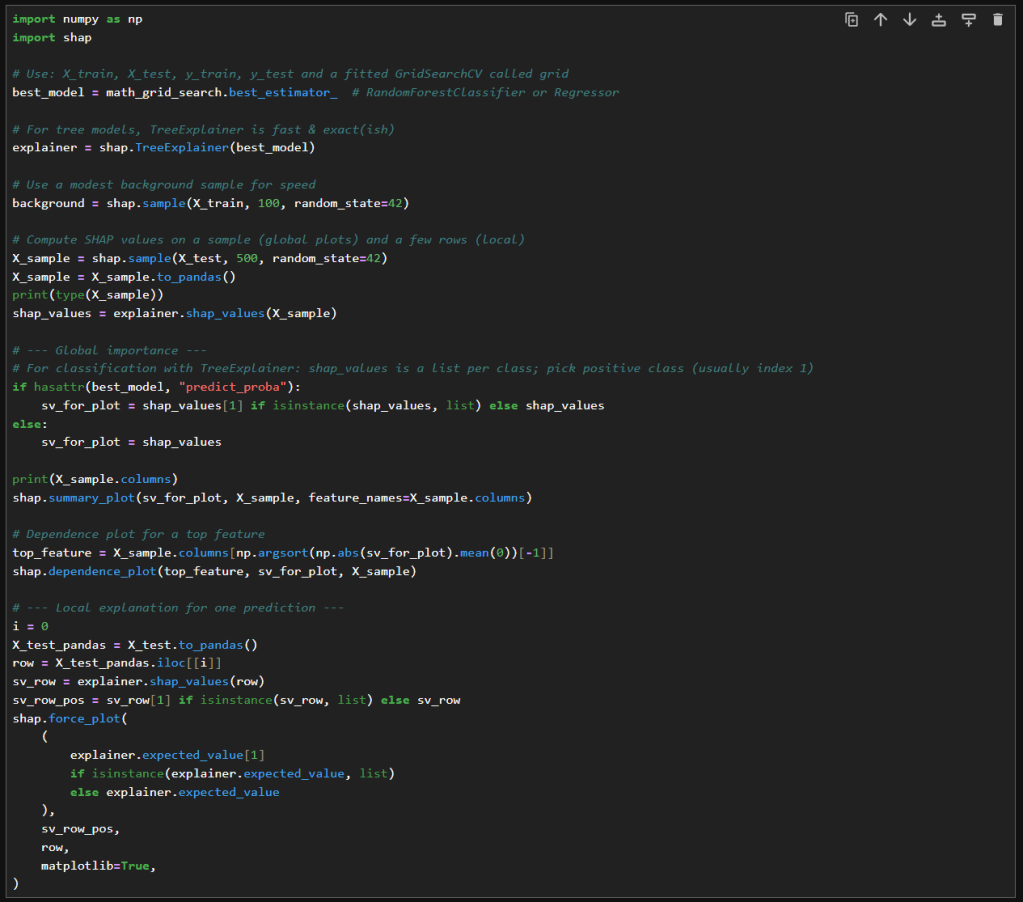
    In this new cell, I use the results of the previous grid search to create a SHAP TreeExplainer from the shap package. With that I create three different types of plots: a summary beeswarn, dependence and force plot.

    SHAP Visualizations

    Interpreting the summary beeswarm plot

    The x-axis shows the SHAP values. Positive values push the prediction higher, towards the positive class or higher score. Negative values push the prediction lower.

    The y-axis shows the features, ranked by overall importance. The most important features are at the top. The spread of SHAP values shows how much influence that feature can have. The wider the spread of dots along the x-axis, the more variability that feature contributes to predictions. Narrow spreads mean the feature has a consistent, smaller effect.

    Each dot represents a single observation for the feature. The color of the dots shows the feature value. Red for high values and blue for low.

    If high feature values (red dots) cluster on the right (positive SHAP values), then higher values of that feature increase the prediction. If high values cluster on the left, then higher values decrease the prediction. Blue dots (low feature values) show the opposite effect.

    Overlapping colors can suggest interactions. For example, if both high and low values of a feature appear on both sides, the feature’s effect may depend on other variables.

    Interpreting the force plot

    The base value is the average model prediction if no features were considered. It’s like the starting point. It is the neutral prediction before considering any features.

    Arrows or bars are the force each feature contributes positively or negatively to the prediction. Each feature either increases or decreases the prediction. The size of the arrow/bar shows the magnitude of its effect.

    • Red (or rightward forces): Push the prediction higher.
    • Blue (or leftward forces): Push the prediction lower.

    The final prediction is the sum of the baseline plus all feature contributions. The endpoint shows the model’s actual output for that instance

    – William

    References

  • Hyperparameter tuning with RandomizedSearchCV

    Hyperparameter tuning with RandomizedSearchCV

    In my previous post, I explored how GridSearchCV can systematically search through hyperparameter combinations to optimize model performance. While powerful, grid search can quickly become computationally expensive, especially as the number of parameters and possible values grows. In this follow-up, I try a more scalable alternative: RandomizedSearchCV. By randomly sampling from the hyperparameter space, this method offers a faster, more flexible way to uncover high-performing configurations without the exhaustive overhead of grid search. Let’s dive into how RandomizedSearchCV works, when to use it, and how it compares in practice.

    What is RandomizedSearchCV

    Unlike GridSearchCV, which exhaustively tests every combination of hyperparameters, RandomizedSearchCV takes a more efficient approach by sampling a fixed number of random combinations from a defined parameter space. This makes it useful when the search space is large or when computational resources are limited. By trading exhaustive coverage for speed and flexibility, RandomizedSearchCV often finds competitive, or even superior, parameter sets with far fewer evaluations. It’s a smart way to explore hyperparameter tuning when you want faster insights without sacrificing rigor.

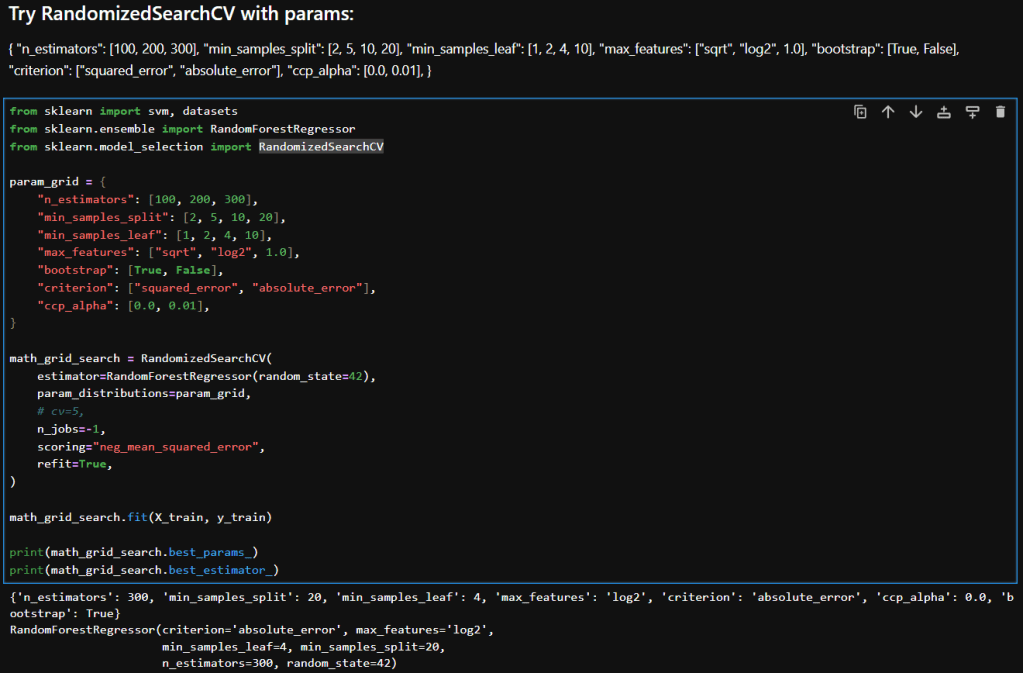
    Hyperparameter Tuning with RandomizedSearchCV

    Here’s a breakdown of each parameter in my param_distributions for RandomizedSearchCV when tuning a RandomForestRegressor:

    ParameterDescription
    n_estimators [100, 200, 300]Number of trees in the forest. More trees can improve performance but increase training time.
    min_samples_split [2, 5, 10, 20]Minimum number of samples required to split an internal node. Higher values reduce model complexity and help prevent overfitting.
    min_samples_leaf [1, 2, 4, 10]Minimum number of samples required to be at a leaf node. Larger values smooth the model and reduce variance.
    max_features ["sqrt", "log2", 1.0]Number of features to consider when looking for the best split. "sqrt" and "log2" are common heuristics; 1.0 uses all features.
    bootstrap [True, False]Whether bootstrap samples are used when building trees. True enables bagging; False uses the entire dataset for each tree.
    criterion ["squared_error", "absolute_error"]Function to measure the quality of a split. "squared_error" (default) is sensitive to outliers; "absolute_error" is more robust.
    ccp_alpha [0.0, 0.01]Complexity parameter for Minimal Cost-Complexity Pruning. Higher values prune more aggressively, simplifying the model.

    Interpretation

    Here is a table that compares the results in my previous post where I experimented with GridSearchCV with what I achieved while using RandomizedSearchCV.

    MetricGridSearchCVRandomizedSearchCVImprovement
    Mean Squared Error (MSE)173.39161.12↓ 7.1%
    Root Mean Squared Error (RMSE)13.1712.69↓ 3.6%
    R² Score0.27160.3231↑ 18.9%

    Interpretation & Insights

    Lower MSE and RMSE:
    RandomizedSearchCV yielded a model with noticeably lower error metrics. The RMSE dropped by nearly half a point, indicating better predictions. While the absolute reduction may seem modest, it’s meaningful in contexts where small improvements translate to better decision-making or cost savings.

    Higher R² Score:
    The R² score improved from 0.27 to 0.32, a relative gain of nearly 19%. This suggests that the model tuned via RandomizedSearchCV explains more variance in the target variable—an encouraging sign of better generalization.

    Efficiency vs Exhaustiveness:
    GridSearchCV exhaustively evaluated all parameter combinations, which can be computationally expensive and potentially redundant. In contrast, RandomizedSearchCV sampled a subset of combinations and still outperformed grid search. This underscores the value of strategic randomness in high-dimensional hyperparameter spaces.

    Model Robustness:
    The improved metrics hint that RandomizedSearchCV may have landed on a configuration that better balances bias and variance—possibly due to more diverse sampling across parameters like min_samples_leaf, criterion, and ccp_alpha.

    Takeaways

    RandomizedSearchCV not only delivered better predictive performance but did so with greater computational efficiency. When I ran GridSearchCV with as many parameters to explore, it ran for a long time. In contrast, RandomizedSearchCV returned almost instantaneously in comparison. For large or complex models like RandomForestRegressor, this approach offers a good balance between exploration and practicality. It’s a great reminder that smarter search strategies can outperform brute-force methods—especially when paired with thoughtful parameter ranges.

    – William

  • Trying my hand at Hyperparameter tuning with GridSearchCV

    Trying my hand at Hyperparameter tuning with GridSearchCV

    In this post, I’ll try using scikit’s GridSearchCV to optimize hyperparameters. GridSearchCV is a powerful tool in scikit-learn that automates the process of hyperparameter tuning by exhaustively searching through a predefined grid of parameter combinations. It evaluates each configuration using cross-validation, allowing you to identify the settings that yield the best performance. It doesn’t guarantee the globally optimal solution, but GridSearchCV provides a reproducible way to improve model accuracy, reduce overfitting, and better understand how a model responds to different parameter choices

    Hyperparameter Tuning with GridSearchCV

    First Attempt

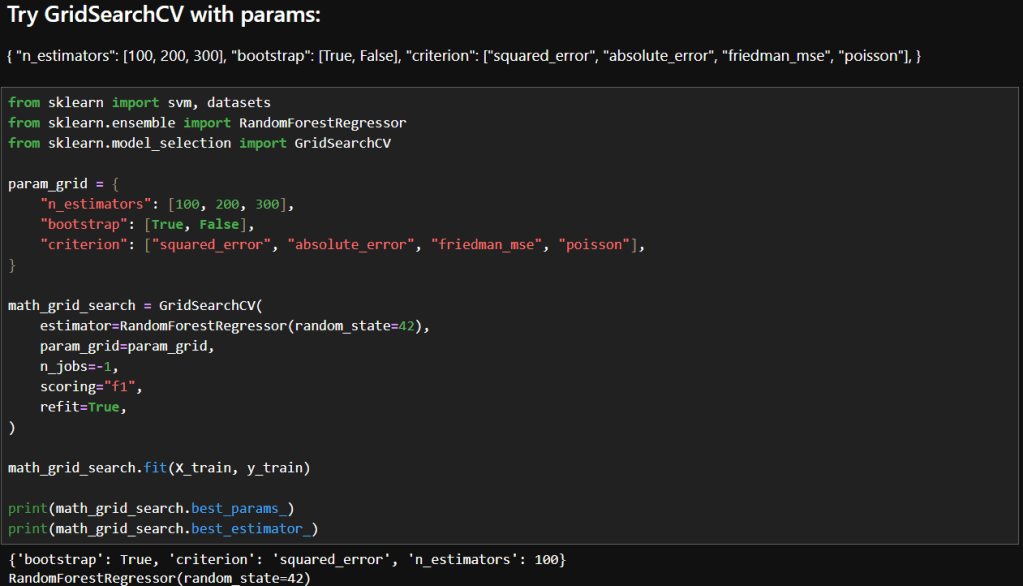
    The images below show the initial parameters I used in my GridSearchCV experimentation and the results. Based on my reading, I decided to try just a few parameters to start. Here are the parameters I chose to start with and a brief description of why I felt each was a good place to start.

    ParameterDescriptionWhy It’s a Good Starting Point
    n_estimatorsNumber of trees in the forestControls model complexity and variance; 100–300 is a practical range for balancing performance and compute.
    bootstrapWhether sampling is done with replacementTests the impact of bagging vs. full dataset training—can affect bias and variance. Bagging means each decision tree in the forest is trained on a random sample of the training data.
    criterionFunction used to measure the quality of a splitOffers diverse loss functions to explore how the model fits different error structures.

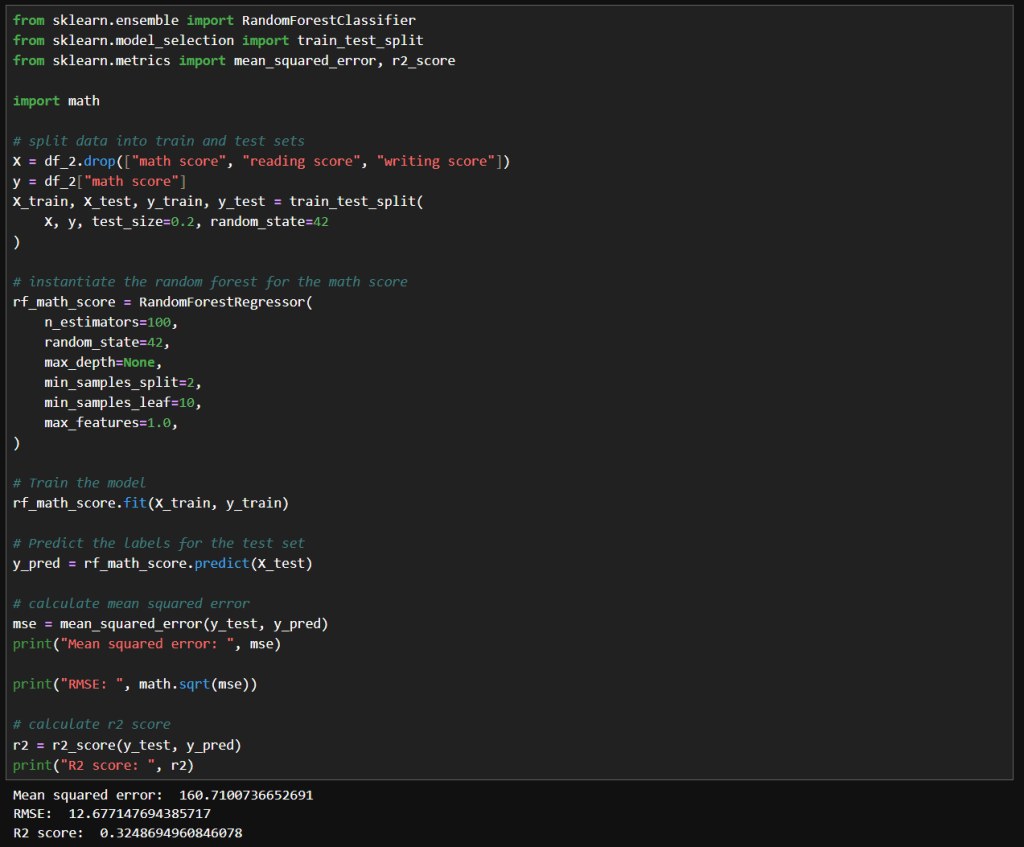
    You may recall in my earlier post that I achieved these results during manual tuning:
    Mean squared error: 160.7100736652691
    RMSE: 12.677147694385717
    R2 score: 0.3248694960846078

    Interpretation

    My Manual Configuration Wins on Performance

    • Lower MSE and RMSE: Indicates better predictive accuracy and smaller average errors.
    • Higher R²: Explains more variance in the target variable.

    Why Might GridSearchCV Underperform Here?

    • Scoring mismatch: I used "f1" as the scoring metric, which I discovered while reading, is actually for classification! So, the grid search may have optimized incorrectly. Since I’m using a regressor, I should use "neg_mean_squared_error" or "r2".
    • Limited search space: My grid only varied n_estimators, bootstrap, and criterion. It didn’t explore other impactful parameters like min_samples_leaf, max_features, or max_depth.
    • Default values: GridSearchCV used default settings for parameters like min_samples_leaf=1, which could lead to overfitting or instability.

    Second Attempt

    In this attempt, I changed the scoring to neg_mean_squared_error. What that does is, it returns the negative of the mean squared error, which makes GridSearchCV minimize the mean square error (MSE). That in turn means that GridSearchCV will choose parameters that minimize large deviations between predicted and actual values.

    So how did that affect results? The below images show what happened.

    While the results aren’t much better, they are more valid because it was a mistake to use F1 scoring in the first place. Using F1 was wrong because:

    • The F1 score is defined for binary classification problems. and I am fitting continuous outputs.
    • F1 needs discrete class labels, not continuous outputs.
    • When used in regression, scikit-learn would have forced predictions into binary labels, which distorts the optimization objective.
    • Instead of minimizing prediction error, it tried to maximize F1 on binarized outputs.

    Reflections

    • The "f1"-optimized model accidentally landed on a slightly better MSE, but this is not reliable or reproducible.
    • The "neg_mean_squared_error" model was explicitly optimized for MSE, so its performance is trustworthy and aligned with my regression goals.
    • The small difference could simply be due to random variation or hyperparameter overlap, not because "f1" is a viable scoring metric here.

    In summary, using "f1" in regression is methodologically invalid. Even if it produces a superficially better score, it’s optimizing the wrong objective and introduces unpredictable behavior.

    In my next post I will try some more parameters and also RandomizedSearchCV.

    – William

  • Playing with Hyperparameter Tuning and Winsorizing

    Playing with Hyperparameter Tuning and Winsorizing

    In this post, I’ll revisit my earlier model’s performance by experimenting with hyperparameter tuning, pushing beyond default configurations to extract deeper predictive power. I’ll also take a critical look at the data itself, exploring how winsorizing outliers can recalibrate outliers without sacrificing the integrity of the data. The goal: refine, rebalance, and rethink accuracy.

    Hyperparameter Tuning

    The image below shows my initial experiment with the RandomForestRegressor. As you can see, I used the default value for n_estimators.

    The resulting MSE, RMSE and R² score are shown. In my earlier post I noted what those values mean. In summary:

    • An MSE of 172 indicates there may be outliers.
    • An RMSE of 13 indicates there an average error of around 13 points on 0–100 scale.
    • An R² of 0.275 means my model explains just 27.5% of the variance in the target variable.

    Experimentation

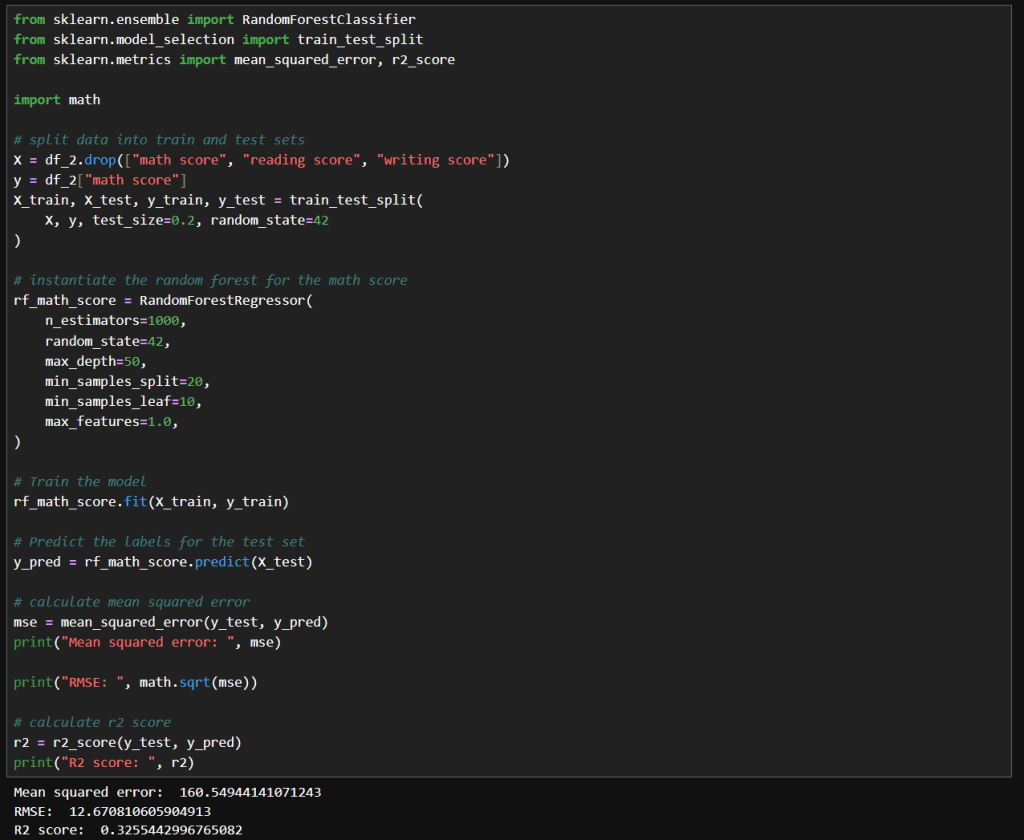
    My first attempt at manual tuning looked like the image below. There really is just a small improvement with these parameters. I tried increasing n_estimators significantly because the accuracy should be improved with the larger value. I tried increasing max_depth to 50 to see if that compares to the default value of None. I tried increasing min_samples_split to 20 and min_samples_leaf of 10 to see if it would help with any noise in the data. I didn’t really need to set max_features to 1.0, because that is currently the default value.

    The net result was slightly better results, but nothing too significant.

    Next, I tried what is shown in the image below. Interestingly, I got very similar results to the above. With these values, the model trains much faster while achieving the same results.

    Winsorizing

    Winsorization changes a dataset by replacing outlier values with less extreme ones. Unlike trimming (which removes outliers), winsorization preserves the dataset size by limiting values at the chosen threshold.

    Here is what my code looks like:

    In this cell, I’ve replaced the math score data a winsorized version. I used the same hyperparameters as before. Here we can see a more significant improvement MSE and RMSE, but a slightly lower R² score.

    That means that since the earlier model has a slightly higher R², it explains a bit more variance relative to the total variance of the target variable. Maybe because it models the core signal more tightly, even though it has noisier estimates.

    The winsorized model, with its lower MSE and RMSE indicate better overall prediction accuracy. This is nice when minimizing absolute error matters the most.

    Final Thoughts

    After experimenting with default settings, I systematically adjusted hyperparameters and applied winsorization to improve my RandomForestRegressor’s accuracy. Here’s a concise overview of the three main runs:

    • Deep, Wide Forest
      • Parameters
        • max_depth: 50
        • min_samples_split: 20
        • min_samples_leaf: 10
        • max_features: 1.0
        • random_state: 42
      • Insights
        • A large ensemble with controlled tree depth and higher split/leaf thresholds slightly reduced variance but yielded only marginal gains over defaults.
    • Standard Forest with Unlimited Depth
      • Parameters
        • max_depth: None
        • min_samples_split: 2
        • min_samples_leaf: 10
        • max_features: 1.0
        • random_state: 42
      • Insights
        • Reverting to fewer trees and no depth limit produced nearly identical performance, suggesting diminishing returns from deeper or wider forests in this setting.
    • Winsorized Data
      • Parameters
        • n_estimators: 100
        • max_depth: None
        • min_samples_split: 2
        • min_samples_leaf: 10
        • max_features: 1.0
        • random_state: 42
        • Applied winsorization to cap outliers
      • Insights
        • Winsorizing outliers drastically lowered absolute error (MSE/RMSE), highlighting its power for stabilizing predictions. The slight drop in R² reflects reduced target variance after capping extremes.

    – William

  • First Post!

    First Post!

    My Journey into the Fascinating World of Data Science

    Inspiration Behind Starting This Blog

    Hello everyone! I’m William, a junior in high school who’s passionate about data science. Ever since I discovered data science, I’ve been fascinated by its potential to solve a myriad of problems. It’s amazing how data science can be applied in so many ways, from improving business strategies to enhancing healthcare. What truly drives me is the possibility of making a difference, starting with education. I have always enjoyed helping my friends with their schoolwork, and I believe that data science can provide powerful insights to improve educational outcomes. Hence, this blog is my way of documenting my journey and sharing my learnings with you.

    Goals of My Data Science Journey

    My primary goal is to learn all about data science—the diverse applications, methodologies, and algorithms that power this field. I want to gain a comprehensive understanding and apply what I learn to the realm of education. By leveraging data science, I aim to uncover insights that can contribute to making education more effective and accessible.

    What Drew Me to Data Science

    My interest in data science was sparked by the movie ‘Moneyball’. I watched it on an airplane, and it opened my eyes to the power of data analytics in sports. This led me to explore the world of data science further, and I discovered its applications stretch far beyond sports. From education to medicine, the possibilities are endless, and I couldn’t wait to dive in.

    Initial Steps

    Starting this journey requires some essential tools and a plan. From my research, I found that a great starting point is the Naive Bayes classifier. It’s a simple yet powerful algorithm that’s often recommended for beginners. Here’s my plan for my first set of blog posts:

    1. Tools and Services: I’ll share the tools and services I’ve learned are essential for data science, from coding environments to data visualization tools.
    2. Setup Steps: I’ll walk you through the steps I used to set up each of these tools, making it easy for you to follow along.
    3. First Algorithm to Learn: I’ll begin with the Naive Bayes classifier, a powerful and simple algorithm that’s great for classification tasks. I’ll provide a writeup of my understanding of the Naive Bayes classifier, breaking down the theory behind it.
    4. Use an Example from Wikipedia: I’ll follow an example I found on Wikipedia to implement the Naive Bayes classifier. That way I can be sure my code works as expected.
    5. Research Available Datasets: Next I’ll then research some education datasets, like on Kaggle.com, and pick one to continue my learning journey by showcasing a real-world application of the algorithm.
    6. Continue my Journey: Then I’ll decide the next algorithm to explore!

    Through this blog, I hope to share my learning experiences and provide valuable insights into the world of data science. Whether you’re a fellow student or someone interested in data science, join me as I explore the endless possibilities and applications of data science!

    Thank you for joining me on this adventure. Stay tuned as I delve deeper into the world of data science and share my experiences, discoveries, and insights with you.

    – William