Category: Services

  • Exploring the Impact of Alcohol Consumption on Student Grades with Gaussian Naive Bayes

    Exploring the Impact of Alcohol Consumption on Student Grades with Gaussian Naive Bayes

    In today’s data-driven world, even seemingly straightforward questions can reveal surprising insights. In this post, I investigate whether students’ alcohol consumption habits bear any relationship to their final math grades. Using the Student Alcohol Consumption dataset from Kaggle, which contains survey responses on a myriad aspects of students’ lives—ranging from study habits and social factors to gender and alcohol use—I set out to determine if patterns exist that can predict academic performance.

    Dataset Overview

    The dataset originates from a survey of students enrolled in secondary school math and Portuguese courses. It includes rich, social, and academic information, such as:

    • Social and family background
    • Study habits and academic support
    • Alcohol consumption details during weekdays and weekends

    I focused on predicting the final math grade (denoted as G3 in the raw data) while probing how alcohol-related features, especially weekend consumption, might play a role in performance. The binary insight wasn’t just about whether students drank, but which drinking pattern might be more telling of their academic results.

    Data Preprocessing: Laying the Groundwork

    Before diving into modeling, the data needed some cleanup. Here’s how I systematically prepared the dataset for analysis:

    1. Loading the Data: I imported the CSV into a Pandas DataFrame for easy manipulation.
    2. Renaming Columns: Clarity matters. I renamed ambiguous columns for better readability (e.g., renaming walc to weekend_alcohol and dalc to weekday_alcohol).
    3. Label Encoding: Categorical data were converted to numeric representations using scikit-learn’s LabelEncoder, ensuring all features could be numerically processed.
    4. Reusable Code: I encapsulated the training and testing phases within a reusable function, which made it straightforward to test different feature combinations.

    Here’s are some snippets:

    In those cells:

    • I rename columns to make them more readable.
    • I instantiate a LabelEncoder object and encode a list of columns that have string values.
    • I add an absence category to normalize absence count a little due to how variable that data is.

    Experimenting With Gaussian Naive Bayes

    The heart of this exploration was to see how well a Gaussian Naive Bayes classifier could predict the final math grade based on different selections of features. Naive Bayes, while greatly valued for its simplicity and speed, operates under the assumption that features are independent—a condition that might not fully hold in educational data.

    Training and Evaluation Function

    To streamline the experiments, I wrote a function that:

    • Splits the data into training and testing sets.
    • Trains a GaussianNB model.
    • Evaluates accuracy on the test set.

    In that cell:

    • I create a function that:
      • Drops unwanted columns.
      • Runs 100 training cycles with the given data.
      • Captures the accuracy measured from each run and returns the average.

    Single and Two column sampling

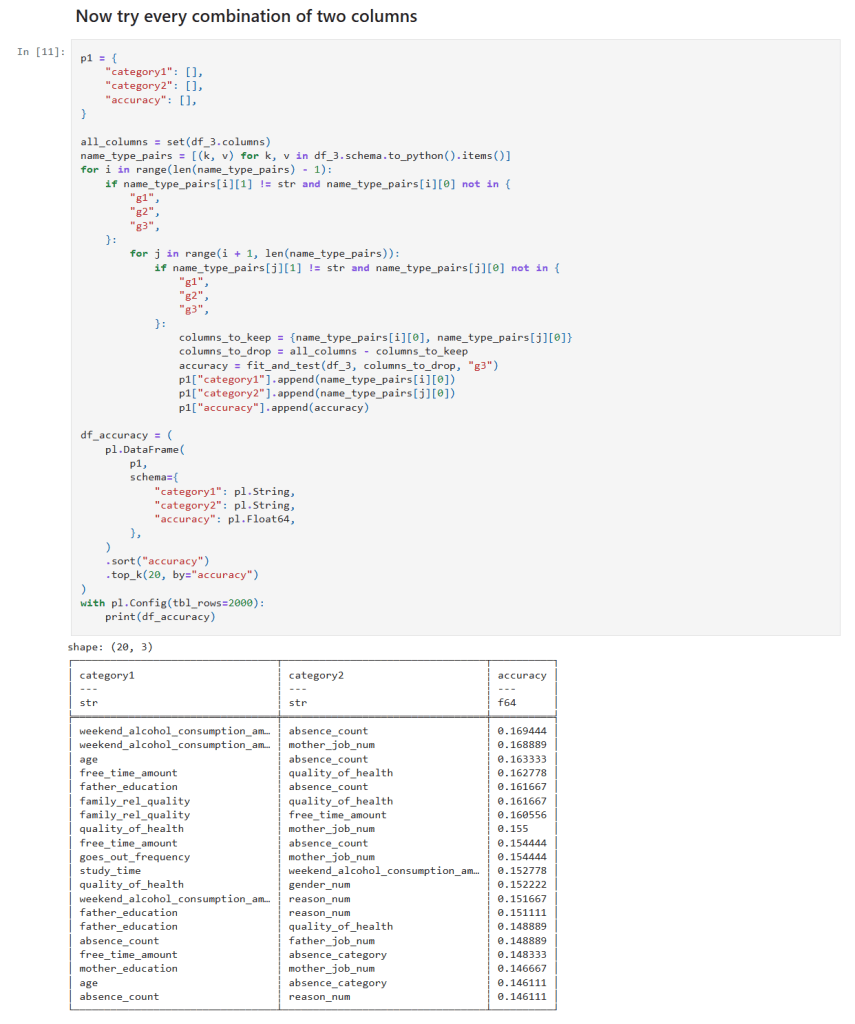
    In those cells:

    • I get a list of all columns.
    • I create loop(s) over the column list and create a list of features to test.
    • I call my function to measure the the accuracy of the features at predicting student grades.

    Diving Into Feature Combinations

    I aimed to assess the predictive power by testing different combinations of features:

    1. All Columns: This gave the best accuracy of around 22%, yet it was clear that even the full spectrum of information struggled to make strong predictions.
    2. Handpicked Features: I manually selected features that I hypothesized might be influential. The resulting accuracy dipped below that of the full dataset.
    3. Individual Features: Evaluating each feature solo revealed that the column indicating whether students planned to pursue higher education yielded the highest individual accuracy—though still far lower than all features combined.
    4. Two-Feature Combinations: By testing all pairs, I noticed that combinations including weekend alcohol consumption appeared in the top 20 predictive pairs four times, including in both of the top two.
    5. Three-Feature Combinations: The trend became stronger—combinations featuring weekend alcohol consumption topped the list ten times and were present in each of the top three combinations!
    6. Four-Feature Combinations: Here, weekend alcohol consumption featured in the top 20 combination results even more robustly—15 times in total.

    These experiments showcased one noteworthy pattern: weekend alcohol consumption consistently emerged as a common denominator in the best-performing feature combinations, while weekday consumption rarely made an appearance.

    Analysis of the Findings

    Several key observations emerged from this series of experiments:

    • Predictive Accuracy: Even with the full set of features, the best accuracy reached was only around 22%. This underwhelming performance is indicative of the challenges posed by the dataset and the restrictive assumptions embedded within the Naive Bayes model.
    • Role of Alcohol Consumption: The repeated appearance of weekend alcohol consumption in high-ranking feature combinations suggests a potential association—it may capture lifestyle or social habits that indirectly correlate with academic performance. However, it is not a standalone predictor; rather, it seems to be relevant as part of a multifactorial interaction.
    • Model Limitations: The Gaussian Naive Bayes classifier assumes feature independence. The complexities inherent in student performance—where multiple social, educational, and psychological factors interact—likely violate this assumption, leading to lower predictive performance.

    Conclusion and Future Directions

    While the Gaussian Naive Bayes classifier provided some interesting insights, especially regarding the recurring presence of weekend alcohol consumption in influential feature combinations, its overall accuracy was modest. Predicting the final math grade, a multifaceted outcome influenced by numerous interdependent factors, appears too challenging for this simplistic probabilistic model.

    Next Steps:

    • Alternative Machine Learning Algorithms: Investigating other approaches like decision trees, random forests, support vector machines, or ensemble methods may yield better performance.
    • Enhanced Feature Engineering: Incorporating interaction terms or domain-specific features might help capture the complex relationships between social habits and academic outcomes.
    • Broader Data Explorations: Diving deeper into other factors—such as study habits, parental support, and extracurricular involvement—could provide additional clarity.

    Final Thoughts and Next Steps

    This journey reinforced the idea that while Naive Bayes is a great tool for its speed and interpretability, it might not be the best choice for all datasets. More sophisticated models and careful feature engineering are necessary when dealing with some datasets like student academic performance.

    The new Jupyter notebook can be found here in my GitHub.

    – William

  • Initial Tool Selection and Setup

    Initial Tool Selection and Setup

    Installing Python on Windows

    The easiest way to install Python on Windows is to use the Windows Store, like this:

    1) Open a Command Prompt: Press the Windows and the S keys, then type cmd and press the Enter key.

    2) Install python: Type python in the command prompt and press the Enter key. This will open the Windows Store with the Python application. Click the install button to install Python.

    3) Check the installation: Run this command back in the command prompt: python --version

    Installing Key Libraries

    With Python installed, you can now install some essential data science libraries. Open Command Prompt or PowerShell and enter the following commands:

    1. Press the Windows button and the S button, type ‘cmd’ and hit enter to open a command shell.
    2. Now create a directory for this project, like C:\Projects\Jupyter, and change to that directory.
    3. Create a python virtual environment: python -m venv .venv
    4. Activate the virtual environment: .venv\scripts\activate
    5. To install polars: pip install polars
    6. To install Jupyter Lab: pip install jupyterlab
    7. To install Jupyter Notebook: pip install notebook
    8. We need to change the directory Jupyter uses to store it’s notebooks. To do that run this command in your Jupyter directory: jupyter notebook --generate-config
    9. The command will tell you where it created the configuration file. Open the file using Notepad and look for the line that has this: c.ServerApp.root_dir
    10. Uncomment the line by removing the # at the beginning of the line and change value to the Jupyter directory you created. The line should look like this: c.ServerApp.root_dir = 'C:\Work\Jupyter'
    11. Save and close the file.

    You can also install Black and use it to keep your code formatted like this:

    • Run this command: pip install black jupyter-black

    I’ll show how to use it in a notebook later.

    Note, you’ll need to run .venv\scripts\activate every time you open a new command shell.

    I’ve chosen to start off using Polars rather than Pandas because it is easy to use and much faster than Pandas.

    Creating and Running a Sample Jupyter Lab Notebook

    Now that you have your tools installed, let’s create and run a sample Jupyter Lab notebook:

    1) Open Jupyter Lab: In Command Prompt or PowerShell, activate the venv and then type: jupyter lab

    2) The URL to access the notebook is printed, so if it doesn’t open in your browser you can copy the address and go to it in your browser manually.

    3) Create a New Notebook: In Jupyter Lab, go to the Launcher tab and select “Python 3” under the Notebook section to create a new notebook.

    4) Add and Run Sample Code: In the new notebook, copy and paste the following code into a cell. You may need to remove the whitespace if you get an error:

    import polars as pl
    
    df = pl.DataFrame(
        {
            "foo": [1, 2, 3],
            "bar": [6, 7, 8],
            "ham": ["a", "b", "c"],
        }
    )
    
    df

    5) Run the Cell: Click the Run button (or press Ctrl + Enter) to execute the cell and see the output. You should see something that looks like this:

    shape: (3, 3)
    foo	bar	ham
    i64	i64	str
    1	6	"a"
    2	7	"b"
    3	8	"c"

  • Essential Tools and Services for My Data Science Learning Journey

    Essential Tools and Services for My Data Science Learning Journey

    Hello again, everyone! As I start on this journey into the world of data science, I want to share the tools and services I’ll be using. Each of these tools has features that make them valuable for data science applications. Let’s dive in and explore why they’re so valuable:

    GitHub.com

    GitHub is a web-based platform that allows developers to collaborate on code, manage projects, and track changes in their codebase using version control (Git). For data science, GitHub is incredibly useful because:

    • Collaboration: It lets me to collaborate with others on data science projects, share my work, and receive feedback from the community.
    • Version Control: I can keep track of changes in my code, experiment with different versions, and easily revert to previous states if needed.
    • Open-Source Projects: I can explore open-source data science projects, learn from others’ work, and contribute to the community.

    Kaggle.com

    Kaggle is a platform dedicated to data science and machine learning. It offers a wide range of datasets, competitions, and learning resources. Kaggle is a must-have for my journey because of its:

    • Datasets: Kaggle provides access to a vast collection of datasets across various domains, including education, which I plan to use for my projects.
    • Competitions: Participating in Kaggle competitions allows me to apply my skills to real-world problems, learn from others, and gain valuable experience.
    • Learning Resources: Kaggle offers tutorials, code notebooks, and forums where I can learn new techniques, ask questions, and improve my understanding of data science concepts.

    Python

    Python is a versatile and widely-used programming language in the data science community. Its popularity stems from several key features:

    • Readability: Python’s syntax is clean and easy to understand, making it an excellent choice for beginners.
    • Libraries: Python has many libraries and frameworks for data analysis, machine learning, and visualization, such as NumPy, pandas, and scikit-learn.
    • Community Support: The Python community is large and active, providing extensive documentation, tutorials, and forums to help me along my learning journey.

    Jupyter Labs

    Jupyter Labs is an interactive development environment that allows me to create and share documents containing live code, equations, visualizations, and narrative text. Its benefits for data science include:

    • Interactive Coding: I can write and execute code in small, manageable chunks, making it easier to test and debug my work.
    • Visualization: Jupyter Labs supports rich visualizations, enabling me to create and display graphs, charts, and plots within my notebooks.
    • Documentation: I can document my thought process, findings, and insights alongside my code, creating comprehensive and reproducible reports.

    Polars DataFrames

    Polars is a fast and efficient DataFrame library for Rust, which also has a Python interface. It is designed to handle large datasets and perform complex data manipulations. Polars is a valuable addition to my toolkit because of its:

    • Performance: Polars is optimized for performance, making it great for handling large datasets and performing computationally intensive tasks.
    • Memory Efficiency: It uses less memory compared to traditional DataFrame libraries, which will help when working with large data.
    • Flexible API: Polars provides a flexible and intuitive API that allows me to perform various data manipulation tasks, such as filtering, grouping, and aggregating data.

    Black

    Black is a code formatter for Python that ensures my code sticks to styling and readability standards. Black is an essential tool for my data science projects because of its:

    • Consistency: Black will automatically format my code to follow best practices, making it more readable and maintainable.
    • Efficiency: With Black taking care of formatting, I can focus on writing code and solving problems.
    • Integration: Black can be easily integrated with Jupyter Lab, so that my code remains consistently formatted within my notebooks.

    By leveraging these tools and services, I will be well-equipped to dive into the world of data science and tackle exciting projects. Stay tuned as I share my experiences and discoveries along the way!

    – William