Tag: technology

  • Trying my hand at Hyperparameter tuning with GridSearchCV

    Trying my hand at Hyperparameter tuning with GridSearchCV

    In this post, I’ll try using scikit’s GridSearchCV to optimize hyperparameters. GridSearchCV is a powerful tool in scikit-learn that automates the process of hyperparameter tuning by exhaustively searching through a predefined grid of parameter combinations. It evaluates each configuration using cross-validation, allowing you to identify the settings that yield the best performance. It doesn’t guarantee the globally optimal solution, but GridSearchCV provides a reproducible way to improve model accuracy, reduce overfitting, and better understand how a model responds to different parameter choices

    Hyperparameter Tuning with GridSearchCV

    First Attempt

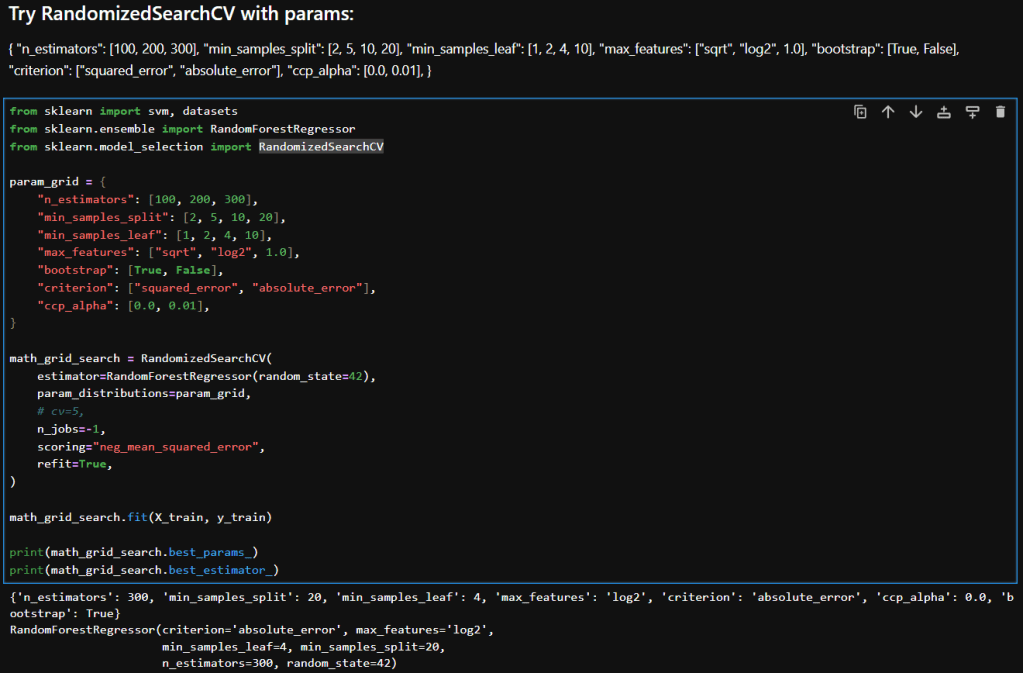
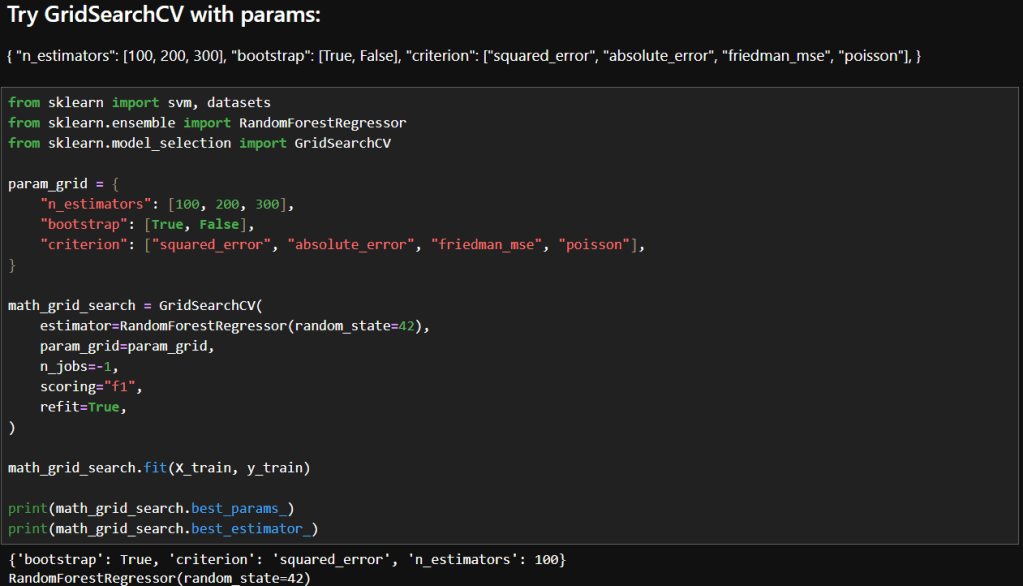
    The images below show the initial parameters I used in my GridSearchCV experimentation and the results. Based on my reading, I decided to try just a few parameters to start. Here are the parameters I chose to start with and a brief description of why I felt each was a good place to start.

    ParameterDescriptionWhy It’s a Good Starting Point
    n_estimatorsNumber of trees in the forestControls model complexity and variance; 100–300 is a practical range for balancing performance and compute.
    bootstrapWhether sampling is done with replacementTests the impact of bagging vs. full dataset training—can affect bias and variance. Bagging means each decision tree in the forest is trained on a random sample of the training data.
    criterionFunction used to measure the quality of a splitOffers diverse loss functions to explore how the model fits different error structures.

    You may recall in my earlier post that I achieved these results during manual tuning:
    Mean squared error: 160.7100736652691
    RMSE: 12.677147694385717
    R2 score: 0.3248694960846078

    Interpretation

    My Manual Configuration Wins on Performance

    • Lower MSE and RMSE: Indicates better predictive accuracy and smaller average errors.
    • Higher R²: Explains more variance in the target variable.

    Why Might GridSearchCV Underperform Here?

    • Scoring mismatch: I used "f1" as the scoring metric, which I discovered while reading, is actually for classification! So, the grid search may have optimized incorrectly. Since I’m using a regressor, I should use "neg_mean_squared_error" or "r2".
    • Limited search space: My grid only varied n_estimators, bootstrap, and criterion. It didn’t explore other impactful parameters like min_samples_leaf, max_features, or max_depth.
    • Default values: GridSearchCV used default settings for parameters like min_samples_leaf=1, which could lead to overfitting or instability.

    Second Attempt

    In this attempt, I changed the scoring to neg_mean_squared_error. What that does is, it returns the negative of the mean squared error, which makes GridSearchCV minimize the mean square error (MSE). That in turn means that GridSearchCV will choose parameters that minimize large deviations between predicted and actual values.

    So how did that affect results? The below images show what happened.

    While the results aren’t much better, they are more valid because it was a mistake to use F1 scoring in the first place. Using F1 was wrong because:

    • The F1 score is defined for binary classification problems. and I am fitting continuous outputs.
    • F1 needs discrete class labels, not continuous outputs.
    • When used in regression, scikit-learn would have forced predictions into binary labels, which distorts the optimization objective.
    • Instead of minimizing prediction error, it tried to maximize F1 on binarized outputs.

    Reflections

    • The "f1"-optimized model accidentally landed on a slightly better MSE, but this is not reliable or reproducible.
    • The "neg_mean_squared_error" model was explicitly optimized for MSE, so its performance is trustworthy and aligned with my regression goals.
    • The small difference could simply be due to random variation or hyperparameter overlap, not because "f1" is a viable scoring metric here.

    In summary, using "f1" in regression is methodologically invalid. Even if it produces a superficially better score, it’s optimizing the wrong objective and introduces unpredictable behavior.

    In my next post I will try some more parameters and also RandomizedSearchCV.

    – William

  • Playing with Hyperparameter Tuning and Winsorizing

    Playing with Hyperparameter Tuning and Winsorizing

    In this post, I’ll revisit my earlier model’s performance by experimenting with hyperparameter tuning, pushing beyond default configurations to extract deeper predictive power. I’ll also take a critical look at the data itself, exploring how winsorizing outliers can recalibrate outliers without sacrificing the integrity of the data. The goal: refine, rebalance, and rethink accuracy.

    Hyperparameter Tuning

    The image below shows my initial experiment with the RandomForestRegressor. As you can see, I used the default value for n_estimators.

    The resulting MSE, RMSE and R² score are shown. In my earlier post I noted what those values mean. In summary:

    • An MSE of 172 indicates there may be outliers.
    • An RMSE of 13 indicates there an average error of around 13 points on 0–100 scale.
    • An R² of 0.275 means my model explains just 27.5% of the variance in the target variable.

    Experimentation

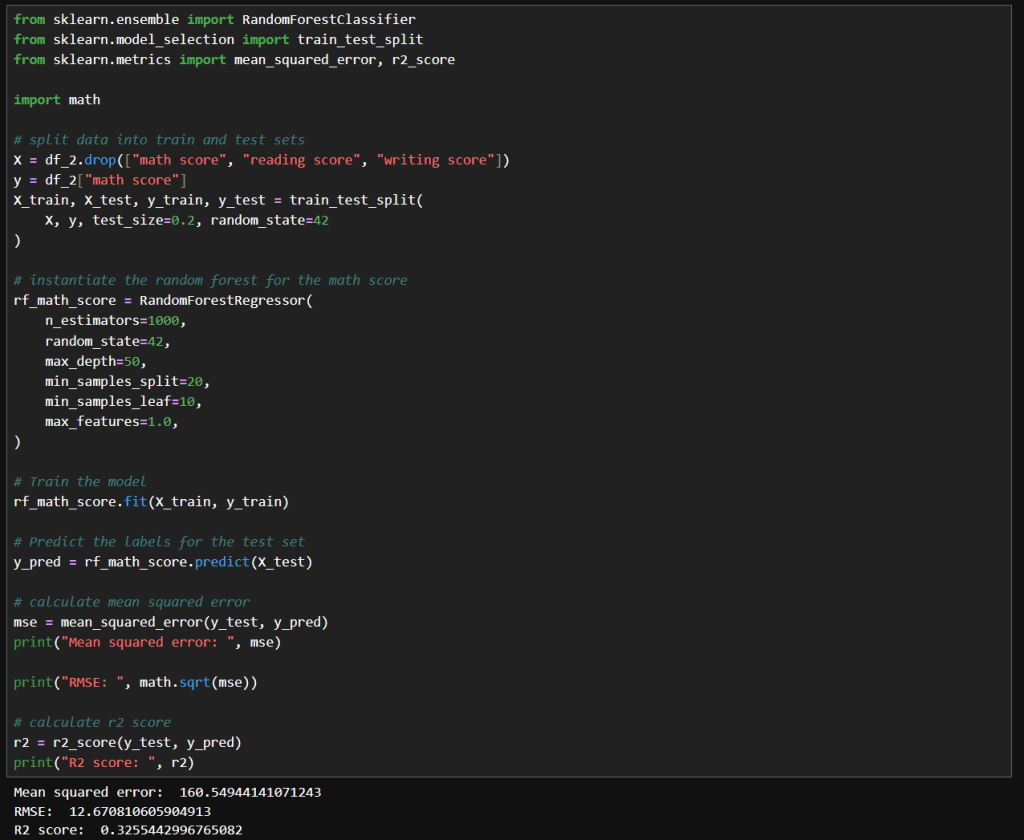
    My first attempt at manual tuning looked like the image below. There really is just a small improvement with these parameters. I tried increasing n_estimators significantly because the accuracy should be improved with the larger value. I tried increasing max_depth to 50 to see if that compares to the default value of None. I tried increasing min_samples_split to 20 and min_samples_leaf of 10 to see if it would help with any noise in the data. I didn’t really need to set max_features to 1.0, because that is currently the default value.

    The net result was slightly better results, but nothing too significant.

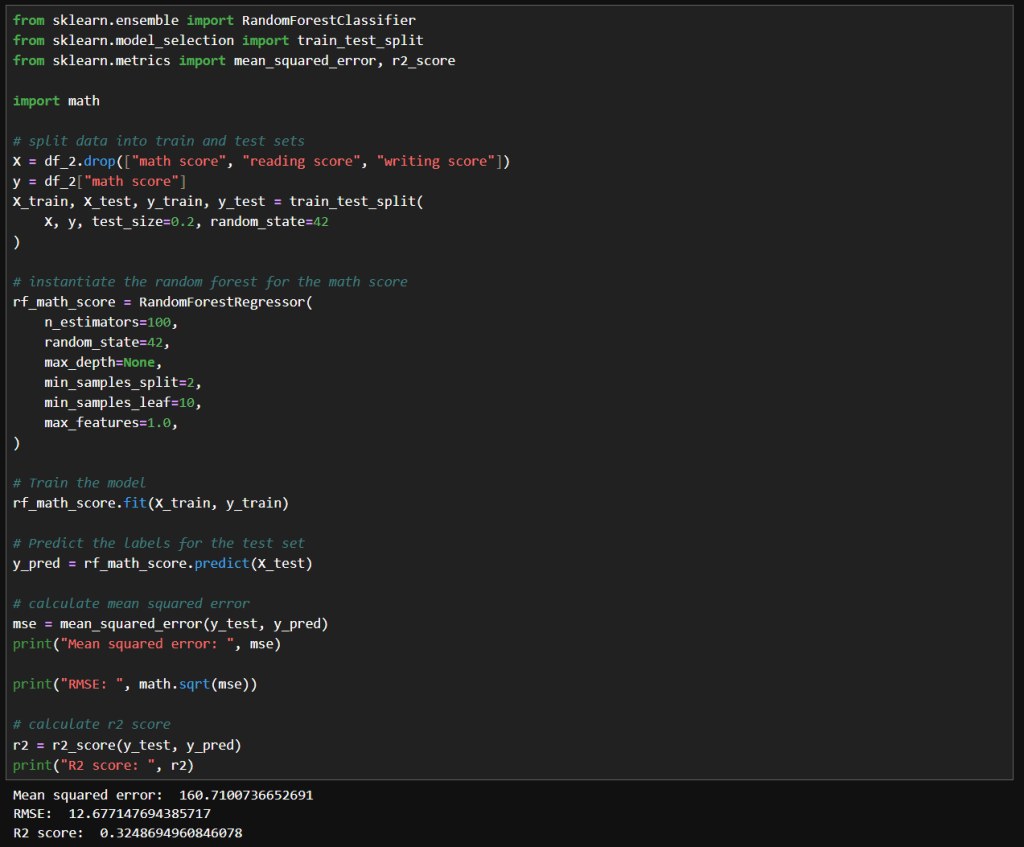
    Next, I tried what is shown in the image below. Interestingly, I got very similar results to the above. With these values, the model trains much faster while achieving the same results.

    Winsorizing

    Winsorization changes a dataset by replacing outlier values with less extreme ones. Unlike trimming (which removes outliers), winsorization preserves the dataset size by limiting values at the chosen threshold.

    Here is what my code looks like:

    In this cell, I’ve replaced the math score data a winsorized version. I used the same hyperparameters as before. Here we can see a more significant improvement MSE and RMSE, but a slightly lower R² score.

    That means that since the earlier model has a slightly higher R², it explains a bit more variance relative to the total variance of the target variable. Maybe because it models the core signal more tightly, even though it has noisier estimates.

    The winsorized model, with its lower MSE and RMSE indicate better overall prediction accuracy. This is nice when minimizing absolute error matters the most.

    Final Thoughts

    After experimenting with default settings, I systematically adjusted hyperparameters and applied winsorization to improve my RandomForestRegressor’s accuracy. Here’s a concise overview of the three main runs:

    • Deep, Wide Forest
      • Parameters
        • max_depth: 50
        • min_samples_split: 20
        • min_samples_leaf: 10
        • max_features: 1.0
        • random_state: 42
      • Insights
        • A large ensemble with controlled tree depth and higher split/leaf thresholds slightly reduced variance but yielded only marginal gains over defaults.
    • Standard Forest with Unlimited Depth
      • Parameters
        • max_depth: None
        • min_samples_split: 2
        • min_samples_leaf: 10
        • max_features: 1.0
        • random_state: 42
      • Insights
        • Reverting to fewer trees and no depth limit produced nearly identical performance, suggesting diminishing returns from deeper or wider forests in this setting.
    • Winsorized Data
      • Parameters
        • n_estimators: 100
        • max_depth: None
        • min_samples_split: 2
        • min_samples_leaf: 10
        • max_features: 1.0
        • random_state: 42
        • Applied winsorization to cap outliers
      • Insights
        • Winsorizing outliers drastically lowered absolute error (MSE/RMSE), highlighting its power for stabilizing predictions. The slight drop in R² reflects reduced target variance after capping extremes.

    – William

  • Analyzing the Random Forest Results

    Analyzing the Random Forest Results

    In this post, I’ll go back and take a look at the results of my earlier post on Random Forests, interpret the performance metrics, try to diagnose problems and identify some techniques I can apply to improve the results.

    Math Score Performance Metrics Summary

    The table below is a summary of the results of the math score analysis from my previous post.

    MetricValueInterpretation
    Mean Squared Error (MSE)172MSE is the average of the squared differences between predicted values and actual values. Since the differences are squared, large errors are penalized more.
    Root MSE (RMSE)≈ 13.11Average error ~13.11 points on 0–100 scale. This means that your model’s predictions are off by roughly 13.1 points on average, which is easier to reason about on a 0–100 scale.
    R² Score0.275Explains ~27.5% of target variance. An R² of 0.275 means my model explains just 27.5% of the variance in the target variable.
    Target Range0 – 100Maximum possible variation is 100 points.

    Interpreting the Numbers

    My RMSE of around 13.1 points means that my predictions are off by 13 units out of 100. That’s the same as a 13% error. The seems pretty high, since that is more than a grade level!

    An R² of 0.275 says that my model captures only 27.5% of the variability in the target. The rest, 72.5%, is unexplained. That means either the dataset is missing features that could help with predictions, or there is a lot of noise in the data, or model is still underfitting.

    Diagnosing Underlying Issues

    • Feature Limitations
      Important variables could be missing, or existing ones may need to be transformed.
    • Data Quality
      Outliers will inflate MSE. Also, how the data is sampled across the target 0–100 range can also impact performance.
    • Model Complexity
      Default hyperparameters, which is what I used, often underfit. The trees may be too shallow (max_depth too low) or too few (n_estimators too small) to capture complex patterns that may exist in the dataset.

    Strategies to Improve Accuracy

    • Revisit Hyperparameter Tuning
      • Try to optimize things like n_estimators, max_depth, etc.
    • Feature Engineering
      • Explore encoding some features.
    • Data Augmentation & Cleaning
      • Look into removing or ‘winsorizing’ outliers.
      • Try to balance samples across target so the distribution isn’t lopsided.
    • Alternative Models & Ensembles
      • Inspect stacking multiple regressors (e.g., combine RF with SVR or k-NN).
      • Use bagging with different tree depths or feature subsets.
    • Robust Validation
      • Monitor training and validation RMSE/R² to detect under/overfitting.

    Final Thoughts and Next Steps

    My first step into learning Random Forests using default parameters didn’t provide the desired accuracy. Researching the possibles cases and techniques to improve accuracy has provided me some direction. In my next post I’ll show how I applied the above and what impact these techniques had on the accuracy of the models.

    – William

  • Deep Dive Into Random Forests

    Deep Dive Into Random Forests

    In today’s post, I’ll take an in-depth look at Random Forests, one of the most popular and effective algorithms in the data science toolkit. I’ll describe what I learned about how they work, their components and what makes them tick.

    What Are Random Forests?

    At its heart, a random forest is an ensemble of decision trees working together.

    • Decision Trees: Each tree as a model that makes decisions by splitting data based on certain features.
    • Ensemble Approach: Instead of relying on a single decision tree, a random forest builds many trees from bootstrapped samples of your data. The prediction from the forest is then derived by averaging (for regression) or taking a majority vote (for classification).

    This approach reduces the variance typical of individual trees and builds a robust model that handles complex feature interactions with ease.

    The Magic Behind the Method

    1. Bootstrap Sampling

    Each tree in the forest is trained on a different subset of data, selected with replacement. This process, known as bagging (Bootstrap Aggregating), means roughly 37% of your data isn’t used in any tree. This leftover data, the out-of-bag (OOB) set, can later be used to internally validate the model without needing a separate validation set.

    2. Random Feature Selection

    At every decision point within a tree, instead of considering every feature, the algorithm randomly selects a subset. This randomness:

    • De-correlates Trees: Each tree becomes less alike, ensuring that the ensemble doesn’t overfit or lean too heavily on one feature.
    • Reduces Variance: Averaging predictions across diverse trees smooths out misclassifications or prediction errors.

    3. Aggregating Predictions

    For classification tasks, each tree casts a vote for a class, and the class with the highest number of votes becomes the model’s prediction.

    For regression tasks, predictions are averaged to produce a final value. This collective approach generally results in higher accuracy and more stable predictions.

    Out-of-Bag (OOB) Error

    An important feature of random forests is the OOB error estimate.

    • What It Is: Each tree is trained on a bootstrap sample, leaving out a set of data that can serve as a mini-test set.
    • Why It Counts: Aggregating predictions on these out-of-bag samples can offer an estimate of the model’s test error.

    This feature can be really handy, especially when you’re working with limited data and want to avoid setting aside a large chunk of it for validation.

    Feature Importance

    Random forests don’t just predict, they can also help you understand your data:

    • Mean Decrease in Impurity (MDI): This measure tallies how much each feature decreases impurity (based on measures like the Gini index) across all trees.
    • Permutation Importance: By shuffling features and measuring the drop in accuracy the importance of a feature can be measured. This is meant to help when you need to interpret the model and communicate which features are most influential.

    Pros and Cons

    Advantages:

    • Can handle Non-Linear Data: Naturally captures complex feature interactions.
    • Can handle Noise & Outliers: Ensemble averaging minimizes overfitting.
    • Doesn’t need a lot of Preprocessing: No need for extensive data scaling or transformation.

    Disadvantages:

    • Can be Memory Intensive: Storing hundreds of trees can be demanding.
    • Slower than a single Tree: Compared to a single decision tree, the ensemble approach require more processing power.
    • Harder to Interpret: The combination of multiple trees makes it harder to interpretability compared to individual trees.

    Summary

    Random Forests are a powerful next step in my journey. With their ability to reduce variance through ensemble learning and their built-in validation mechanisms like OOB error, they offer both performance and insight.

    In my next post, I’ll share how I apply the Random Forest technique to this data set: https://www.kaggle.com/datasets/whenamancodes/students-performance-in-exams/data

    – William

  • Experimenting with Model Stacking on Student Alcohol Consumption Data

    Experimenting with Model Stacking on Student Alcohol Consumption Data

    In this blog post, I’m building on my previous work with the Student Alcohol Consumption dataset on Kaggle. My latest experiments can be found in the updated Jupyter notebook. In this updated analysis, I explored several new approaches—including using linear regression, stacking models, applying feature transformations, and leveraging visualization—to compare model performances in both prediction and classification scenarios.

    Recap: From the Previous Notebook

    Before diving into the latest experiments, here’s a quick overview of what I did earlier:

    • I explored using various machine learning algorithms on the student alcohol dataset.
    • I identified promising model combinations and created baseline plots to display their performance.
    • My earlier analysis provided a solid framework for experimentation with stacking and feature transformation techniques.

    This post builds directly on that foundation.

    Experiment 1: Using Linear Regression

    Motivation:

    I decided to try a linear regression model because it excels at predicting continuous numerical values—like house prices or temperature. In this case, I was curious to see how well it could predict student grades or scaled measures of drinking behavior.

    What I Did:
    • I trained a linear regression model on the dataset.
    • I applied a StandardScaler to ensure that numeric features were well-scaled.
    • The predictions were then evaluated by comparing them visually (using plots) and numerically to other approaches.
    Observation:

    Interestingly, the LinearRegression model, when calibrated with the StandardScaler, yielded better results than using Gaussian Naive Bayes (GNB) alone. A plot of the predictions against actual values made it very clear that the linear model provided smoother and more reliable estimates.

    Experiment 2: Stacking Gaussian Naive Bayes with Linear Regression

    Motivation:

    I wanted to experiment with stacking models that are generally not used together. Despite the literature primarily avoiding a combination of Gaussian Naive Bayes with linear regression, I was intrigued by the possibility of capturing complementary characteristics of both:

    • GNB brings in a generative, probabilistic perspective.
    • Linear Regression excels in continuous predictions.
    What I Did:
    • I built a stacking framework where the base learners were GNB and linear regression.
    • Each base model generated predictions, which were then used as input (meta-features) for a final meta-model.
    • The goal was to see if combining these perspectives could offer better performance than using either model alone.
    Observation:

    Stacking GNB with linear regression did not appear to improve results over using GNB alone. The combined predictions did not outperform linear regression’s stand-alone performance, suggesting that in this dataset the hybrid approach might have introduced noise rather than constructive diversity in the predictions.

    Experiment 3: Stacking Gaussian Naive Bayes with Logistic Regression

    Motivation:

    While exploring stacking architectures, I found that combining GNB with logistic regression is more common in the literature. Since logistic regression naturally outputs calibrated probabilities and aligns well with classification tasks, I hoped that:

    • The generative properties of GNB would complement the discriminative features of logistic regression.
    • The meta-model might better capture the trade-offs between these approaches.
    What I Did:
    • I constructed a stacking model where the two base learners were GNB and logistic regression.
    • Their prediction probabilities were aggregated to serve as inputs to the meta-learner.
    • The evaluation was then carried out using test scenarios similar to those in my previous notebook.
    Observation:

    Even though the concept seemed promising, stacking GNB with logistic regression did not lead to superior results. The final performance of the stack was not significantly better than what I’d seen with GNB alone. In some cases, the combined output underperformed compared to linear regression alone.

    Experiment 4: Adding a QuantileTransformer

    Motivation:

    A QuantileTransformer remaps features to follow a uniform or a normal distribution, which can be particularly useful when dealing with skewed data or outliers. I introduced it into the stacking pipeline because:

    • It might help models like GNB and logistic regression (which assume normality) to produce better-calibrated probability outputs.
    • It provides a consistent, normalized feature space that might enhance the meta-model’s performance.
    What I Did:
    • I added the QuantileTransformer as a preprocessing step immediately after splitting the data.
    • The transformed features were used to train both the base models and the meta-learner in the stacking framework.
    Observation:

    Surprisingly, the introduction of the QuantileTransformer did not result in a noticeable improvement over the GNB results without the transformer. It appears that, at least under my current experimental settings, the transformed features did not bring out the expected benefits.

    Experiment 5: Visualizing Model Results with Matplotlib

    Motivation:

    Visual analysis can often reveal trends and biases that plain numerical summaries might miss. Inspired by examples on Kaggle, I decided to incorporate plots to:

    • Visually compare the performance of different model combinations.
    • Diagnose potential issues such as overfitting or miscalibration.
    • Gain a clearer picture of model behavior across various scenarios.
    What I Did:
    • I used Matplotlib to plot prediction distributions and error metrics.
    • I generated side-by-side plots comparing the predictions from linear regression, the stacking models, and GNB alone.
    Observation:

    The plots proved invaluable. For instance, a comparison plot clearly highlighted that linear regression with StandardScaler outperformed the other approaches. Visualization not only helped in understanding the behavior of each model but also served as an effective communication tool for sharing results.

    Experiment 6: Revisiting Previous Scenarios with the Stacked Model

    Motivation:

    To close the loop, I updated my previous analysis function to use the stacking model that combined GNB and logistic regression. I reran several test scenarios and generated plots to directly compare these outcomes with earlier results.

    What I Did:
    • I modified the function that earlier produced performance plots.
    • I then executed those scenarios with the new stacked approach and documented the differences.
    Observation:

    The resulting plots confirmed that—even after tuning—the stacked model variations (both with linear regression and logistic regression) did not surpass the performance of linear regression alone. While some combinations were competitive, none managed to outshine the best linear regression result that I had seen earlier.

    Final Thoughts and Conclusions

    This journey into stacking models, applying feature transformations, and visualizing the outcomes has been both enlightening and humbling. Here are my key takeaways:

    • LinearRegression Wins (for Now): The linear regression model, especially when combined with a StandardScalar, yielded better results compared to using GNB or any of the stacked variants.
    • Stacking Challenges:
      • GNB with Linear Regression: The combination did not improve performance over GNB alone.
      • Stacking GNB with Logistic Regression: Although more common in literature, this approach did not lead to a significant boost in performance in my first attempt.
    • QuantileTransformer’s Role: Despite its promise, the QuantileTransformer did not produce the anticipated improvements. Its impact may be more nuanced or require further tuning.
    • Visualizations Are Game Changers: Adding plots was immensely helpful to better understand model behavior, compare the effectiveness of different approaches, and provide clear evidence of performance disparities.
    • Future Directions: It’s clear that further experimentation is necessary. I plan to explore finer adjustments and perhaps more sophisticated stacking strategies to see if I can bridge the gap between these models.

    In conclusion, while I was hoping that combining GNB with logistic regression would yield better results, my journey shows that sometimes the simplest approach—in this case, linear regression with proper data scaling—can outperform more complex ensemble methods. I look forward to further refinements and welcome any ideas or insights from the community on additional experiments I could try.

    I hope you found this rundown as insightful as I did during the experimentation phase. What do you think—could there be yet another layer of transformation or model combination that might tip the scales? Feel free to share your thoughts, and happy modeling!

    – William

  • Exploring the Impact of Alcohol Consumption on Student Grades with Gaussian Naive Bayes

    Exploring the Impact of Alcohol Consumption on Student Grades with Gaussian Naive Bayes

    In today’s data-driven world, even seemingly straightforward questions can reveal surprising insights. In this post, I investigate whether students’ alcohol consumption habits bear any relationship to their final math grades. Using the Student Alcohol Consumption dataset from Kaggle, which contains survey responses on a myriad aspects of students’ lives—ranging from study habits and social factors to gender and alcohol use—I set out to determine if patterns exist that can predict academic performance.

    Dataset Overview

    The dataset originates from a survey of students enrolled in secondary school math and Portuguese courses. It includes rich, social, and academic information, such as:

    • Social and family background
    • Study habits and academic support
    • Alcohol consumption details during weekdays and weekends

    I focused on predicting the final math grade (denoted as G3 in the raw data) while probing how alcohol-related features, especially weekend consumption, might play a role in performance. The binary insight wasn’t just about whether students drank, but which drinking pattern might be more telling of their academic results.

    Data Preprocessing: Laying the Groundwork

    Before diving into modeling, the data needed some cleanup. Here’s how I systematically prepared the dataset for analysis:

    1. Loading the Data: I imported the CSV into a Pandas DataFrame for easy manipulation.
    2. Renaming Columns: Clarity matters. I renamed ambiguous columns for better readability (e.g., renaming walc to weekend_alcohol and dalc to weekday_alcohol).
    3. Label Encoding: Categorical data were converted to numeric representations using scikit-learn’s LabelEncoder, ensuring all features could be numerically processed.
    4. Reusable Code: I encapsulated the training and testing phases within a reusable function, which made it straightforward to test different feature combinations.

    Here’s are some snippets:

    In those cells:

    • I rename columns to make them more readable.
    • I instantiate a LabelEncoder object and encode a list of columns that have string values.
    • I add an absence category to normalize absence count a little due to how variable that data is.

    Experimenting With Gaussian Naive Bayes

    The heart of this exploration was to see how well a Gaussian Naive Bayes classifier could predict the final math grade based on different selections of features. Naive Bayes, while greatly valued for its simplicity and speed, operates under the assumption that features are independent—a condition that might not fully hold in educational data.

    Training and Evaluation Function

    To streamline the experiments, I wrote a function that:

    • Splits the data into training and testing sets.
    • Trains a GaussianNB model.
    • Evaluates accuracy on the test set.

    In that cell:

    • I create a function that:
      • Drops unwanted columns.
      • Runs 100 training cycles with the given data.
      • Captures the accuracy measured from each run and returns the average.

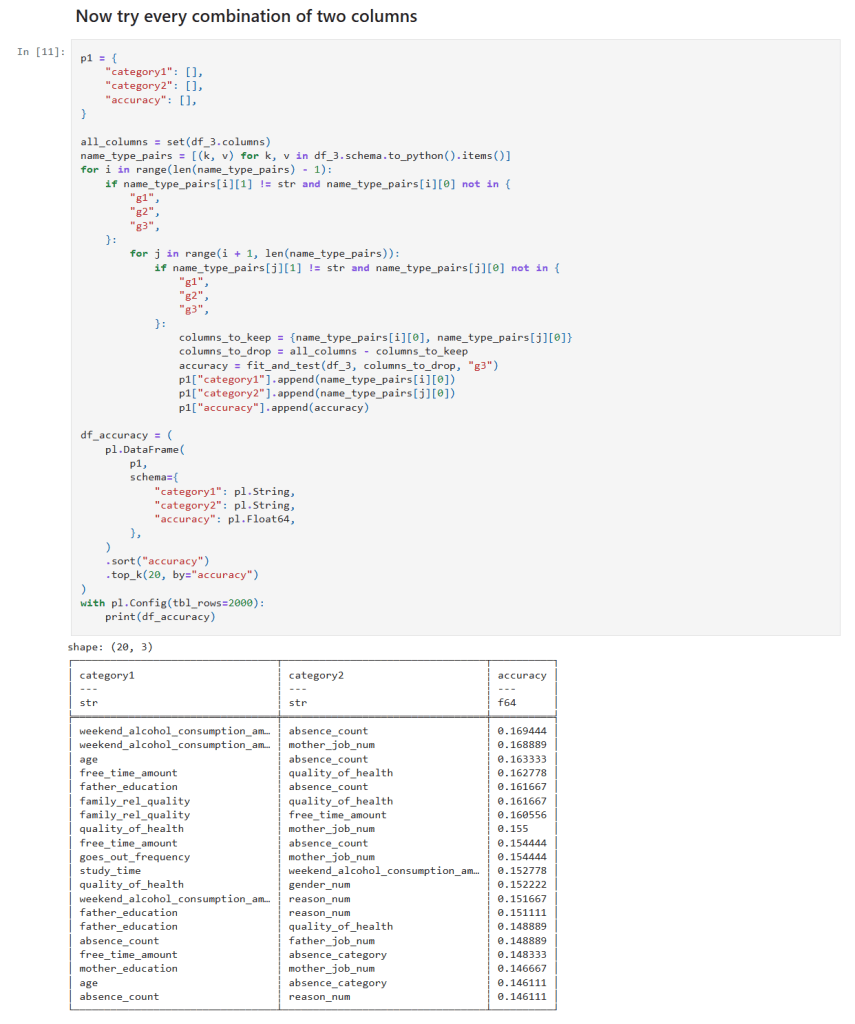
    Single and Two column sampling

    In those cells:

    • I get a list of all columns.
    • I create loop(s) over the column list and create a list of features to test.
    • I call my function to measure the the accuracy of the features at predicting student grades.

    Diving Into Feature Combinations

    I aimed to assess the predictive power by testing different combinations of features:

    1. All Columns: This gave the best accuracy of around 22%, yet it was clear that even the full spectrum of information struggled to make strong predictions.
    2. Handpicked Features: I manually selected features that I hypothesized might be influential. The resulting accuracy dipped below that of the full dataset.
    3. Individual Features: Evaluating each feature solo revealed that the column indicating whether students planned to pursue higher education yielded the highest individual accuracy—though still far lower than all features combined.
    4. Two-Feature Combinations: By testing all pairs, I noticed that combinations including weekend alcohol consumption appeared in the top 20 predictive pairs four times, including in both of the top two.
    5. Three-Feature Combinations: The trend became stronger—combinations featuring weekend alcohol consumption topped the list ten times and were present in each of the top three combinations!
    6. Four-Feature Combinations: Here, weekend alcohol consumption featured in the top 20 combination results even more robustly—15 times in total.

    These experiments showcased one noteworthy pattern: weekend alcohol consumption consistently emerged as a common denominator in the best-performing feature combinations, while weekday consumption rarely made an appearance.

    Analysis of the Findings

    Several key observations emerged from this series of experiments:

    • Predictive Accuracy: Even with the full set of features, the best accuracy reached was only around 22%. This underwhelming performance is indicative of the challenges posed by the dataset and the restrictive assumptions embedded within the Naive Bayes model.
    • Role of Alcohol Consumption: The repeated appearance of weekend alcohol consumption in high-ranking feature combinations suggests a potential association—it may capture lifestyle or social habits that indirectly correlate with academic performance. However, it is not a standalone predictor; rather, it seems to be relevant as part of a multifactorial interaction.
    • Model Limitations: The Gaussian Naive Bayes classifier assumes feature independence. The complexities inherent in student performance—where multiple social, educational, and psychological factors interact—likely violate this assumption, leading to lower predictive performance.

    Conclusion and Future Directions

    While the Gaussian Naive Bayes classifier provided some interesting insights, especially regarding the recurring presence of weekend alcohol consumption in influential feature combinations, its overall accuracy was modest. Predicting the final math grade, a multifaceted outcome influenced by numerous interdependent factors, appears too challenging for this simplistic probabilistic model.

    Next Steps:

    • Alternative Machine Learning Algorithms: Investigating other approaches like decision trees, random forests, support vector machines, or ensemble methods may yield better performance.
    • Enhanced Feature Engineering: Incorporating interaction terms or domain-specific features might help capture the complex relationships between social habits and academic outcomes.
    • Broader Data Explorations: Diving deeper into other factors—such as study habits, parental support, and extracurricular involvement—could provide additional clarity.

    Final Thoughts and Next Steps

    This journey reinforced the idea that while Naive Bayes is a great tool for its speed and interpretability, it might not be the best choice for all datasets. More sophisticated models and careful feature engineering are necessary when dealing with some datasets like student academic performance.

    The new Jupyter notebook can be found here in my GitHub.

    – William

  • What I learned about the Gaussian Naive Bayes Classifier

    What I learned about the Gaussian Naive Bayes Classifier

    Description of Gaussian Naive Bayes Classifier

    Naive Bayes classifiers are simple supervised machine learning algorithms used for classification tasks. They are called “naive” because they assume that the features are independent of each other, which may not always be true in real-world scenarios. The Gaussian Naive Bayes classifier is a type of Naive Bayes classifier that works with continuous data. Naive Bayes classifiers have been shown to be very effective, even in cases where the the features aren’t independent. They can also be trained even with small datasets and are very fast once trained.

    Main Idea: The main idea behind the Naive Bayes classifier is to use Bayes’ Theorem to classify data based on the probabilities of different classes given the features of the data. Bayes’ Theorem says that we can tell how likely something is to happen, based on what we already know about something else that has already happened.

    Gaussian Naive Bayes: The Gaussian Naive Bayes classifier is used for data that has a continuous distribution and does not have defined maximum and minimum values. It assumes that the data is distributed according to a Gaussian (or normal) distribution. In a Gaussian distribution the data looks like a bell curve if it is plotted. This assumption lets us use the Gaussian probability density function to calculate the likelihood of the data. Below are the steps needed to train a classifier and then use to to classify a sample record.

    Steps to Calculate Probabilities (the hard way):

    1. Calculate the Averages (Means):
      • For each feature in the training data, calculate the mean (average) value.
      • To calculate the mean the sum of the values are divided by the number of values.
    2. Calculate the Square of the Difference:
      • For each feature in the training data, calculate the square of the difference between each feature value and the mean of that feature.
      • To calculate the square of the difference we subtract the mean from a value and square the result.
    3. Sum the Square of the Difference:
      • Sum the squared differences for each feature across all data points.
      • Calculating this is easy, we just add up all the squared differences for each feature.
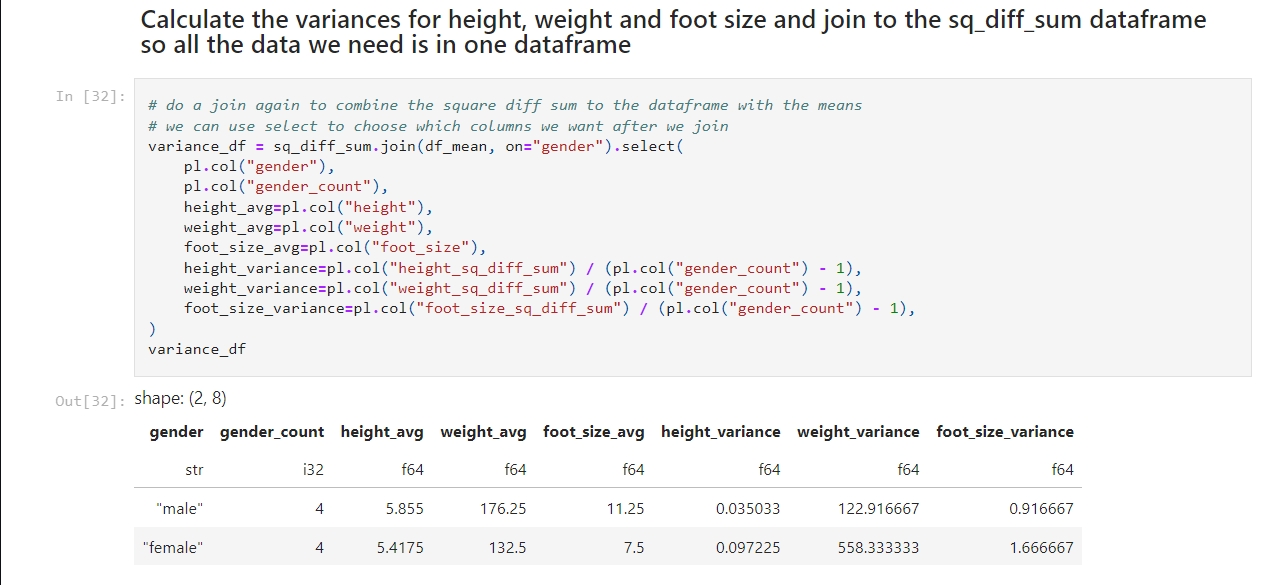
    4. Calculate the Variance:
      • Calculate the variance for each feature using the sum of the squared differences.
      • We calculate the variance by dividing the sum of the squares of the differences by the number of values minus 1.
    5. Calculate the Probability Distribution:
      • Use the Gaussian probability density function to calculate the probability distribution for each feature.
      • The formula for this is complicated! It goes like this:
        • First take: 1 divided by the square root of 2 times pi times the variance.
        • Multiply that by e to the power of -1 times the square of the value to test minus the mean of the value divided by 2 times the variance.
    6. Calculate the Posterior Numerators:
      • Calculate the posterior numerator for each class by multiplying the prior probability of the class with the probability distributions of each feature given the class.
    7. Classify the sample data:
      • The higher result from #6 is the result.

    I created a Jupyter notebook that performs these calculations based on this example I found on Wikipedia. Here is my notebook on GitHub. If you follow the instructions in my previous post you can run this notebook for yourself.

    – William

    References

    1. Wikipedia contributors. (2025, February 17). Naive Bayes classifier. In Wikipedia, The Free Encyclopedia. Retrieved from https://en.wikipedia.org/wiki/Naive_Bayes_classifier
    2. Wikipedia contributors. (2025, February 17). Variance: Population variance and sample variance. In Wikipedia, The Free Encyclopedia. Retrieved from https://en.wikipedia.org/wiki/Variance#Population_variance_and_sample_variance
    3. Wikipedia contributors. (2025, February 17). Probability distribution. In Wikipedia, The Free Encyclopedia. Retrieved from https://en.wikipedia.org/wiki/Probability_distribution
  • Essential Tools and Services for My Data Science Learning Journey

    Essential Tools and Services for My Data Science Learning Journey

    Hello again, everyone! As I start on this journey into the world of data science, I want to share the tools and services I’ll be using. Each of these tools has features that make them valuable for data science applications. Let’s dive in and explore why they’re so valuable:

    GitHub.com

    GitHub is a web-based platform that allows developers to collaborate on code, manage projects, and track changes in their codebase using version control (Git). For data science, GitHub is incredibly useful because:

    • Collaboration: It lets me to collaborate with others on data science projects, share my work, and receive feedback from the community.
    • Version Control: I can keep track of changes in my code, experiment with different versions, and easily revert to previous states if needed.
    • Open-Source Projects: I can explore open-source data science projects, learn from others’ work, and contribute to the community.

    Kaggle.com

    Kaggle is a platform dedicated to data science and machine learning. It offers a wide range of datasets, competitions, and learning resources. Kaggle is a must-have for my journey because of its:

    • Datasets: Kaggle provides access to a vast collection of datasets across various domains, including education, which I plan to use for my projects.
    • Competitions: Participating in Kaggle competitions allows me to apply my skills to real-world problems, learn from others, and gain valuable experience.
    • Learning Resources: Kaggle offers tutorials, code notebooks, and forums where I can learn new techniques, ask questions, and improve my understanding of data science concepts.

    Python

    Python is a versatile and widely-used programming language in the data science community. Its popularity stems from several key features:

    • Readability: Python’s syntax is clean and easy to understand, making it an excellent choice for beginners.
    • Libraries: Python has many libraries and frameworks for data analysis, machine learning, and visualization, such as NumPy, pandas, and scikit-learn.
    • Community Support: The Python community is large and active, providing extensive documentation, tutorials, and forums to help me along my learning journey.

    Jupyter Labs

    Jupyter Labs is an interactive development environment that allows me to create and share documents containing live code, equations, visualizations, and narrative text. Its benefits for data science include:

    • Interactive Coding: I can write and execute code in small, manageable chunks, making it easier to test and debug my work.
    • Visualization: Jupyter Labs supports rich visualizations, enabling me to create and display graphs, charts, and plots within my notebooks.
    • Documentation: I can document my thought process, findings, and insights alongside my code, creating comprehensive and reproducible reports.

    Polars DataFrames

    Polars is a fast and efficient DataFrame library for Rust, which also has a Python interface. It is designed to handle large datasets and perform complex data manipulations. Polars is a valuable addition to my toolkit because of its:

    • Performance: Polars is optimized for performance, making it great for handling large datasets and performing computationally intensive tasks.
    • Memory Efficiency: It uses less memory compared to traditional DataFrame libraries, which will help when working with large data.
    • Flexible API: Polars provides a flexible and intuitive API that allows me to perform various data manipulation tasks, such as filtering, grouping, and aggregating data.

    Black

    Black is a code formatter for Python that ensures my code sticks to styling and readability standards. Black is an essential tool for my data science projects because of its:

    • Consistency: Black will automatically format my code to follow best practices, making it more readable and maintainable.
    • Efficiency: With Black taking care of formatting, I can focus on writing code and solving problems.
    • Integration: Black can be easily integrated with Jupyter Lab, so that my code remains consistently formatted within my notebooks.

    By leveraging these tools and services, I will be well-equipped to dive into the world of data science and tackle exciting projects. Stay tuned as I share my experiences and discoveries along the way!

    – William